How to Track Which TikTok Posts Bring Paying Customers
Learn how to tag TikTok links, connect visits to purchases, and see which posts drive real revenue instead of likes.

NoirTrack team·Follow

The simplest way is to tag every TikTok link with a unique UTM campaign, then connect your payment data so each sale inherits its source. Tracking which TikTok posts bring paying customers means giving each post its own link and tying sales back to that link. That gives you post-level revenue, not just clicks or views. It does not help if you never tag the link or if buyers come back later through another channel before purchasing.
TikTok views are easy to count, but paying customers are the number that matters. A post with 50,000 views and zero sales tells you less than one with 300 views and three paid orders. The goal is to give every post a unique link, then tie sales back to that source. Once the tracking is in place, you can compare posts by revenue, not vanity metrics.
After this, you will know how to set up TikTok links, connect sales data, and find the posts that actually drive revenue.
How do you tag TikTok links so each post is separate?
Tag each TikTok link with its own UTM campaign so one post does not hide inside another. NoirTrack reads those parameters automatically and groups visits by source and campaign, so you can compare a hook video, a product demo, and a founder clip as separate traffic sources instead of one blended bucket. Keep utm_source and utm_medium stable, then change utm_campaign for each post so the clicks stay easy to sort later. If you reuse one plain link everywhere, you lose the split between posts and every visit lands in the same source row.
What should each TikTok link contain?
-
Keep the source and medium fixed. Use the same
utm_sourceandutm_mediumon every TikTok post so the channel stays grouped as one source. That gives you a clean slice for TikTok traffic when you filter the dashboard. -
Change the campaign for each post. Make
utm_campaigndescribe the post itself, such as the hook, topic, or date. A link likehttps://yoursite.com/pricing?utm_source=tiktok&utm_medium=social&utm_campaign=demo-hooktells you exactly which post sent the visit. -
Use the same destination URL. Send every post to the same offer page, then vary only the tracking parameters. That keeps the landing page constant, so the campaign name carries the difference instead of the URL path.
If you want the full parameter reference, use the tracking parameter rules. The short version is simple: stable source, stable medium, unique campaign.
How do you keep the naming usable?
Pick one format and stick to it. Topic-first works well for most teams because it sorts by subject: pricing-demo-2026-10-23, faq-answer-2026-10-24, founder-story-2026-10-25. Date-first can work too if you post a lot, but the important part is consistency, not style.
Avoid abbreviations that only make sense this week. ghj1 saves time once and costs time every time you read revenue later. A clear campaign name lets you open the campaign report and see which post brought revenue without guessing what the label means.
A useful rule is this: if you cannot read the campaign name and know what the post was in two seconds, rename it.
That naming habit also makes comparisons cleaner when you pair campaigns with revenue data later. Each post stays separate, each click stays traceable, and the campaign list stays readable as it grows.
How do you turn TikTok clicks into revenue data?
To turn TikTok clicks into revenue data, you first capture the visit, then connect your payment provider so NoirTrack can match the sale back to the same visitor journey. Once revenue is synced, you can see which TikTok posts earn money, not just which ones bring traffic. That gives you the business view instead of a traffic view.
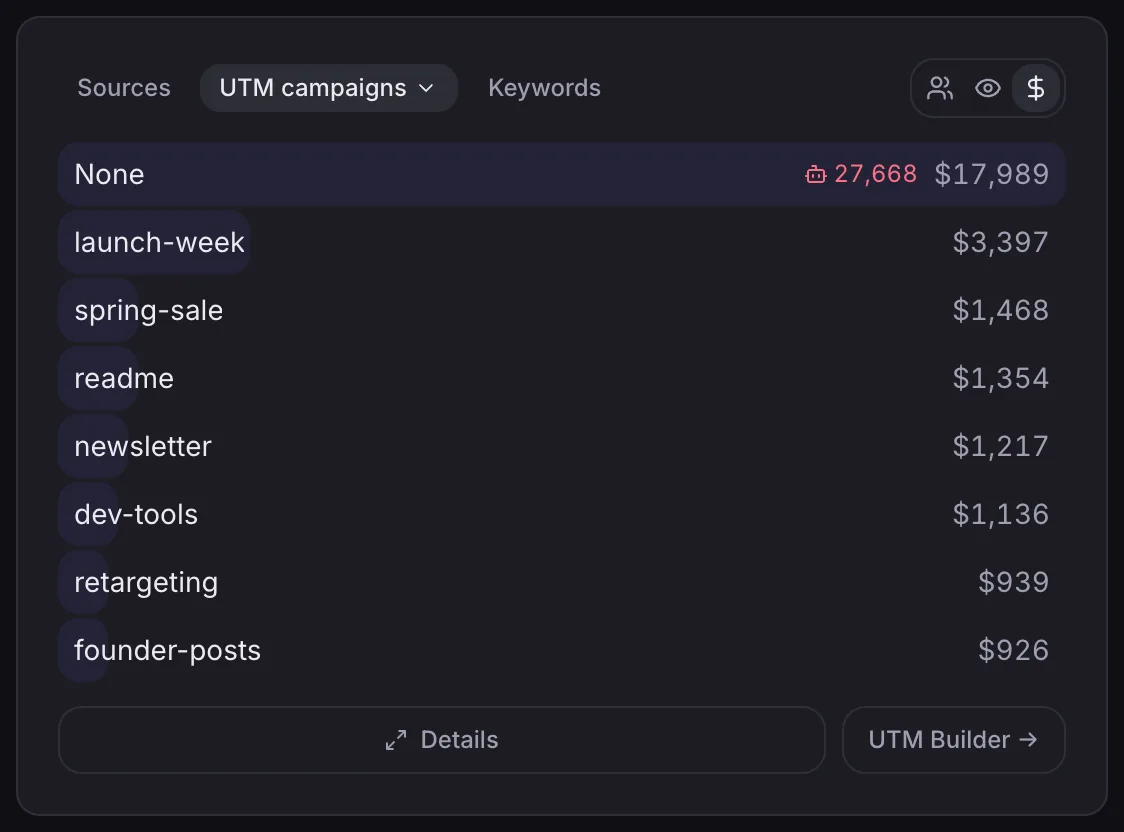
What NoirTrack adds here
NoirTrack links each sale back to the source and campaign that led to it, so you can rank TikTok traffic by revenue and compare posts by money earned. The Sources panel shows campaigns with revenue, and the transactions view shows each sale with its source, which makes the connection easy to verify. If you want the matching rules, the revenue attribution docs spell out how NoirTrack ties a payment to the visitor who made it.
A simple setup looks like this: a visitor lands from https://yoursite.com/?utm_source=tiktok&utm_medium=social&utm_campaign=clip-7, browses pricing, then buys later that day. NoirTrack groups that visit under tiktok and matches the payment back to that source once your provider syncs the sale.
Which payment setups fit this workflow?
Use the revenue attribution flow with a connected provider when you want source-level sales reporting. NoirTrack supports direct connections for Stripe, Paddle, Polar, Lemon Squeezy, Dodo Payments, and Creem. If your payment system is different, the payment API flow lets your backend send sales, refunds, and cancellations with the visitor context attached.
- Connect one provider. Open Site → Settings → Revenue and link the processor you charge through.
- Pass the visitor through checkout. The most reliable match uses the visitor id from the original visit.
- Send the sale event. Your backend or provider sync sends the payment back to NoirTrack, which matches it to the visit.
- Check the source and revenue. The sale appears with the TikTok source that brought the buyer in.
If you use a store platform, connect the processor underneath it. Shopify runs on Stripe, and WooCommerce uses the gateway already in place. That keeps the revenue trail attached to the original visit instead of breaking at checkout.
How do you find the TikTok posts that actually convert?
Filter the dashboard to one TikTok campaign or one post, then rank it by revenue so you can see which link brought buyers instead of which one got the most clicks. That is how you track which TikTok posts bring paying customers without mixing one post's traffic with another. If a purchase happens later, use a goal so the signup or checkout step still shows up in the same source view.
What should you compare side by side?
Compare the post, campaign, visits, goal completions, and revenue in one view. A post with 800 visits and 3 sales can beat a post with 2,000 visits and 0 sales, so the higher click count can mislead you if you stop there.
| Post | Visits | Goal completions | Revenue |
|---|---|---|---|
| TikTok A | 800 | 3 | $240 |
| TikTok B | 2,000 | 0 | $0 |
That table tells you what matters fast. TikTok A brought fewer clicks, but it produced money, so it deserves more attention than the post that only filled the top of the funnel.
Keep an eye on the same audience segment across several posts. If the same kind of viewer keeps buying from one angle, you have a repeatable message, not a one-off spike. This is also where a filter helps, because you can narrow the whole dashboard to one campaign or segment and compare the numbers without leaving the view filters.
How NoirTrack helps here
NoirTrack lets you click into a campaign value and filter the dashboard to that slice, then save it for reuse. That gives you a clean view for one TikTok post, one campaign, or one audience segment.
Goals turn a signup, purchase, or other action into a conversion rate you can break down by source and campaign. If a sale happens after a signup, you can still read the path through the earlier goal instead of losing the post that started it goals.
Once revenue is connected, the dashboard can rank sources by revenue after the payment data arrives. For example, if two TikTok posts each send 500 visits but one brings $180 and the other brings $20, the difference is visible immediately in the revenue column revenue tracking.
Which TikTok metrics should you ignore when judging sales?
Views, likes, and comments tell you how far a post spread, but they do not tell you whether it brought buyers. A post can get 20,000 views and zero sales, while another gets 800 views and two paid customers. If you want to track which TikTok posts bring paying customers, judge each post by visits that carry tags, goals that fire, and revenue that lands in your account.
Clicks only matter when NoirTrack can match them to a visit and then to a recorded sale. That means the useful chain is link click, tracked visit, sale. Anything before the sale is a signal, not a result. If you tag a link with utm_source=tiktok&utm_campaign=launch, NoirTrack groups those visits under that post so you can compare them later with revenue. See how tracking parameters work and how revenue gets attributed.
What is a better scorecard?
Use one table for sales and keep engagement in a separate column so it stays visible without driving the decision.
| Post | Visits | Goals | Revenue | Conversion rate | Likes/comments |
|---|---|---|---|---|---|
| Spring demo | 120 | 9 | $540 | 7.5% | 84 |
| Feature clip | 220 | 6 | $720 | 2.7% | 310 |
Sort by revenue first, then use conversion rate as the tie breaker. In this example, the feature clip gets more engagement, but the spring demo turns a smaller audience into more buyers per visit. That is the post you would keep, repeat, and test again.
How do you avoid broken TikTok attribution?
Broken TikTok attribution happens when the click, the visit, and the sale stop using the same tracking path. If a TikTok bio link, pinned post link, or landing page link uses different parameters, or if the buyer passes through an untagged step, the sale can land in direct or unknown instead of the post that started it. To track which TikTok posts bring paying customers, keep the whole path consistent and remove your own testing from the view before you judge results.
What usually breaks the link?
Missing tracking parameters on the post link cause most problems. NoirTrack reads UTM parameters automatically, so a bare link gives you less to work with than a tagged one. A second untracked hop can also hide the original source. If someone clicks a TikTok bio link, lands on a short redirect page, and then clicks a plain checkout link, the sale may lose the post that sent it.
A simple tagged link looks like this:
https://yoursite.com/?utm_source=tiktok&utm_medium=social&utm_campaign=launch&utm_content=pinned-post-1
Keep the naming stable. Use one source value for all TikTok traffic, then vary the campaign or content field for each post so you can compare them later. Testing can also distort the picture if you and your team keep refreshing the page and starting fake checkouts. A small account can look busy when half the visits came from internal checks.
What should you check first in NoirTrack?
Start by filtering the dashboard to one campaign and checking whether visits and sales line up. NoirTrack lets you click a value in a report and narrow the whole dashboard to that slice, which makes it easier to see whether one post brought traffic without sales or a sale without a clear source. If a post looks strong but shows no revenue, check the revenue and transactions views next.
- Filter to one campaign. Click the TikTok campaign value and inspect the visits, conversion rate, and revenue together.
- Check revenue and transactions. If the traffic is there but sales are missing, the buyer-to-sale match may be failing at checkout or on the success page.
- Exclude internal noise. If your team is testing the flow, set exclusions before you compare posts. NoirTrack supports include and exclude filters, and you can save a segment for the clean view you keep using.
If your own visits are still showing up, use filters and segments to remove them before you call one post a winner.
What is the fastest way to start tracking TikTok sales?
Create one tracked link for a single TikTok post, connect revenue, and check the first sale before you scale the workflow. Use the same naming pattern for the next post so comparisons stay clean. Add UTM parameters to the link with campaign tracking and connect your payment source in revenue attribution.
Your next three steps
- Add UTM parameters to the next TikTok link you publish.
- Connect your payment source so sales can match back to visits.
- Open the dashboard, filter to that campaign, and read the revenue result.
When should you expand beyond one post?
Expand after you can see one post's visits and sales side by side. Then publish the next batch with the same naming pattern and compare them in filters. That gives you a clean base for deciding which hooks and calls to action deserve more posts.
Questions, answered.
The best way to track which TikTok posts bring paying customers is to tag each post with unique UTM parameters and connect your payment data so sales are attributed back to the original TikTok source. Give each post its own source, campaign, or content value, then keep the same naming pattern across every link. Once payment data is connected, you can see which post led to the sale instead of guessing from clicks alone.
TikTok revenue tracking usually takes light setup work and a small amount of ongoing cleanup. You create tracked links, connect payments, and check the dashboard by campaign. After that, the main work is keeping names consistent so each post rolls up to the right report.
Click tracking shows traffic from a post, while revenue tracking shows whether that traffic actually bought. Clicks tell you which TikTok posts get attention. Revenue tracking ties those visits to paid orders, so you can judge posts by money instead of visits.
The most common mistake when tracking TikTok sales is sharing untagged links or using different links in different places. That breaks the chain between the post and the purchase, so the sale cannot be tied back to one source. Use one tracked link per post and keep it the same everywhere you share it.
Try NoirTrack
See which traffic actually pays.
Analytics with revenue attribution and a built-in bot firewall. One script tag, live in two minutes.
Free 14-day trial, no credit card
Written by NoirTrack team
The privacy-first Google Analytics alternative with a built-in bot firewall and revenue attribution. See which traffic makes you money, no cookie banner.


